
When you need to send a fax, you will need the full fax number, including the country code. For example, a fax sent to a US fax number requires 1 before the area code. See how to dial to learn how to dial a number.
Faxing has evolved since the days of the Fax Machine. It is no longer restricted to those beasts of a machine! You can now send faxes through the internet, from our website, through email, or (with some extra hardware) through traditional fax machines.
Sending a Fax from a Website
To send a fax from the website:
-
Log into the Gazelle Portal at: https://efax.gazl.co/
-
Click on the green “Send Faxes” button on your dashboard.
- Choose the fax number you will send from
- Enter the fax number you will send to.
- Attach the documents you want to send. You can attach up to three documents with a size no greater than 30 MBs combined.
- (Optional) Fill in the From Name, To Name, To Company, Subject, and/or Message for the cover page.
- Confirm that all the information is correct.
- Once you confirm that the information is correct, press Send Fax.
Sending a Fax through Email
To send a fax through email:
- Compose the cover letter of the fax in the body of your email.
-
Send the email to 1<fax number>@send.faxmessage.net
- For example, if you are dialing to a US fax number (312-555-1212), you will type in: 13125551212@send.faxmessage.net
- Since Fax numbers operate on the same phone lines as regular telephone numbers, you can refer to this article to determine how to dial to any fax machine in the world. Type the number and add ‘@send.faxmessage.net’ at the end of it. (1)
For numbers within the NANP area, do not include any international dialing code: 0, 011, 001
When dialing using international numbers, you can use international codes.
- For example, if you are dialing to an Armenian fax number (+374 94 311 353) from Canada, you will type: 01137494311353@send.faxmessage.net.
Through a Traditional Fax Machine
These days, older fax machines still use telephone lines to transmit documents. They are safe, as they operate through the telephone lines. However, most fax machines are difficult, expensive, and impractical to maintain. (2) Despite that, faxing still is used in many businesses, and old fax machines are still useful with modern business.
With the advent of Fax over IP, many companies are switching towards eFax services. However, in order to use a traditional fax machine with Fax over IP, you will need an Analog Telephone Adapter (ATA). The reason is because:
- Old fax machines have standard telephone ports (RJ11 ports). To use with eFax services, an adapter is needed to connect it to the internet.
- It removes the need for an expensive landline connection.
- It gives new life to old fax machines by connecting it to online fax providers.
- Some ATAs give enhanced encryption and secure fax features that phone lines do not have. (3)
ATAs will look like this:
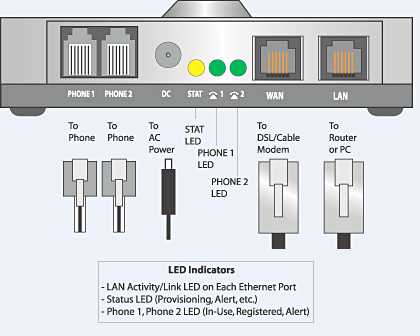
To set up your fax with an ATA:
- Connect the power adaptor to and AC Outlet and the ATA connection labeled “Power”
- Connect the phone cable from the port labeled “Fax” on the ATA to the “Line In” port on the Fax Appliance. Many fax devices have (2) phone line ports on them. One is to connect a telephone handset to the device, the other is for the phone line the device will use to send & receive faxes. It is necessary to use the “Line In” port.
- Connect the ethernet cable to the WAN port on the ATA and your internet connection (router, switch, etc.)
- Wait up to 5 minutes for the Power, Online & WAN lights to go steady green and you are ready to begin sending & receiving faxes as you normally would on the fax appliance.
The Gazelle team hope this helps!
Comments
Please sign in to leave a comment.